EventGrid TriggerのAzure Functionをローカルで動かす方法
Azure Function のトリガーの種類により、ローカルでの実行方法が異なります。
HTTP トリガー
http://localhost:<PORT>/api/<FUNCTION_NAME>にリクエストする事で実行できます。
(EventGrid Trigger を除く) HTTP トリガー以外
- Azure Function の 管理者エンドポイント ( =
http://localhost:<PORT>/admin/functions/<FUNCTION_NAME>) にリクエストする事で実行できます。
- Azure Function の 管理者エンドポイント ( =
EventGrid トリガー
- EventGrid Trigger の URL (=
http://localhost:7071/runtime/webhooks/eventgrid?functionName={FUNCTION_NAME}) にリクエストする事で実行できます。
- EventGrid Trigger の URL (=
ドキュメントはこちら
Core Tools を使用してローカルで Azure Functions を開発する - ローカル関数を実行する
EventGrid TriggerのAzure Functionをローカルで動かす方法 を以下に記載します。
バージョン
- Azure Function Runtime Version:
4.25.3.21264 - Azure Functions Core Tools:
4.0.5413 Commit hash: N/A (64-bit)
今回やった事
- Azure Functions extension for Visual Studio Code で
EventGrid トリガーの Azure Functionを作成 - Event Grid Viewerアプリ で EventGrid のイベントメッセージを取得
EventGrid Trigger の URLにリクエストする際、 Request Body でイベントメッセージを指定する必要がある為、予め実際のイベントメッセージを取得しておきます
- Azure Functions Core Tools の
func コマンドで Azure Function をローカルでホスト - EventGrid Trigger の URL にリクエストし、ローカルでホストしている Azure Function をトリガー
1. Azure Functions extension for Visual Studio Code で EventGrid トリガーの Azure Function を作成
今回は Azure Functions extension for Visual Studio Code を利用して Azure Function を作成します。
ドキュメント
手順
VSCode > Azure Functions extension > WORCSPACEの Function アイコンより、Create New Project...を押下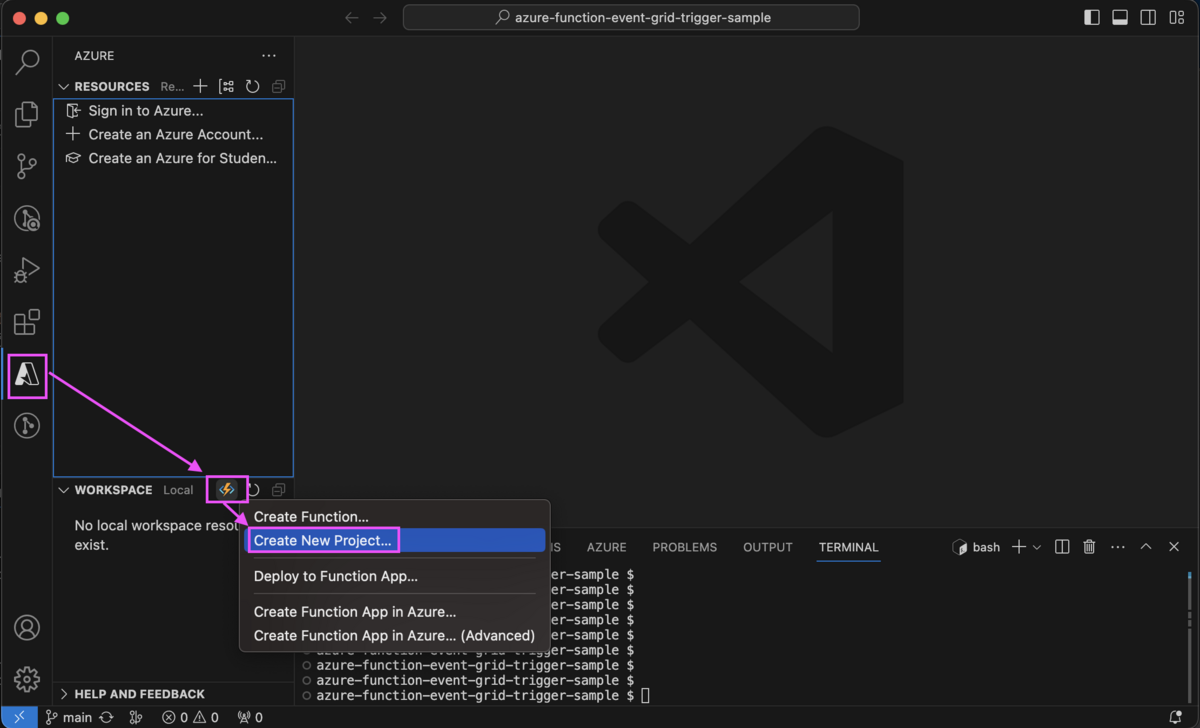
TypeScript,Model V4,Azure Event Grid Triggerと選択し、関数名を入力(今回はeventGridTriggerSample)し、Enterを押下すると、eventGridTriggerSample 関数が作成される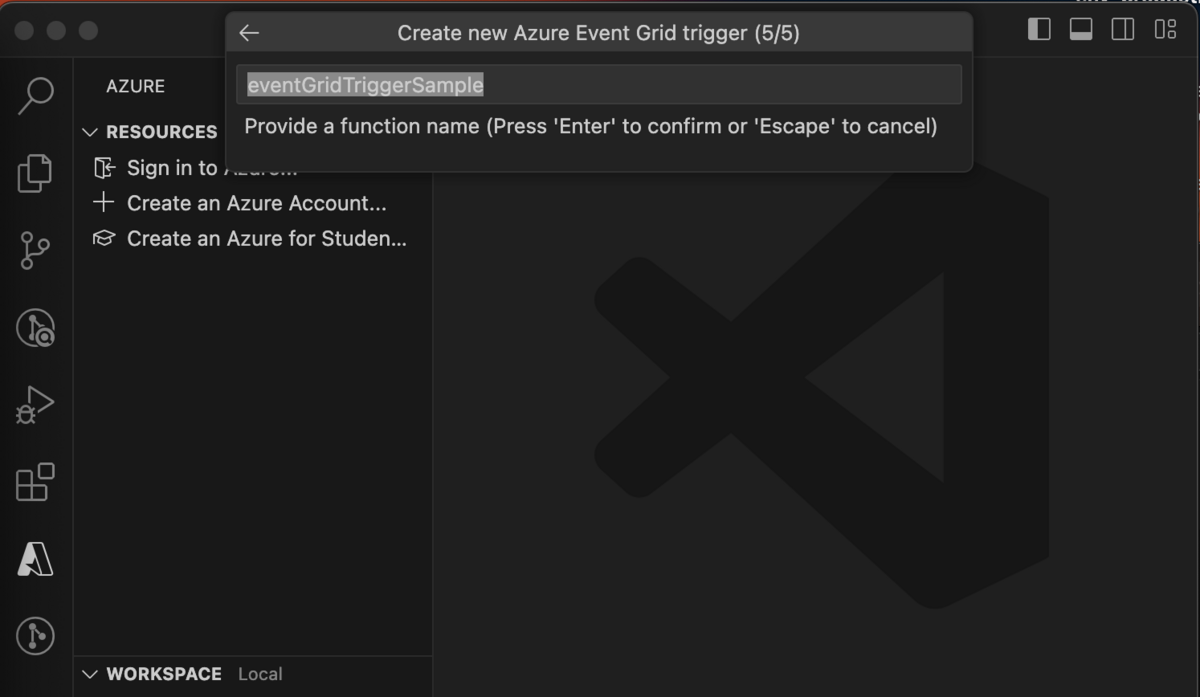
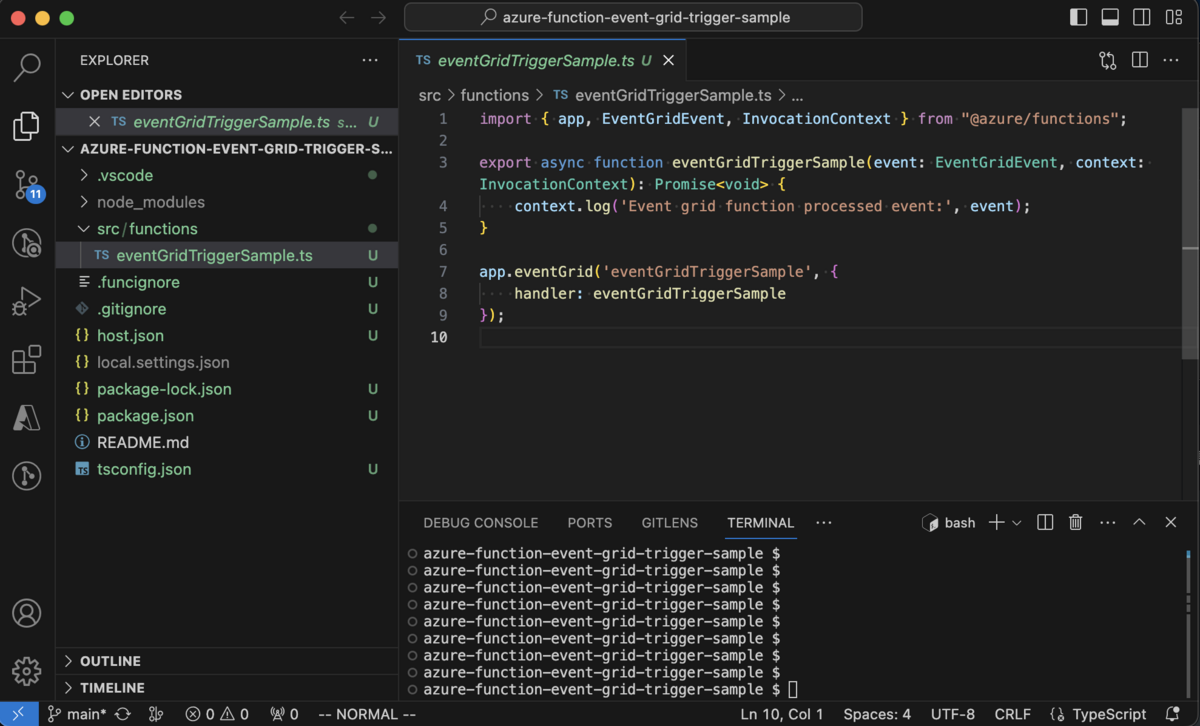
2. Event Grid Viewer アプリ で EventGrid のイベントメッセージを取得
EventGrid Trigger の URL にリクエストする際、 Request Body でイベントメッセージを指定する必要がある為、予め実際のイベントメッセージを取得しておきます。
今回は Azure BLOB Storage Container へファイルがアップロードされた際のイベントメッセージを、Event Grid Viewerアプリで取得します 。
2-1. Event Grid Viewer アプリをデプロイ
※Event Grid Viewer アプリ = ドキュメントの ビューアー Web アプリ の事。
EventGridのイベントメッセージをキャプチャする為の Event Grid Viewer アプリ を、learn.microsoft.com にあるARMテンプレートを利用して Azure AppService にカスタム デプロイします。
ドキュメント
手順
learn.microsoft.com の ビューアー Web アプリを作成するより、
Deploy to Azureボタンを押下ブラウザで https://portal.azure.com/#create/Microsoft.Template が起動するので、サブスクリプション/リソースグループと、インスタンスの詳細を入力
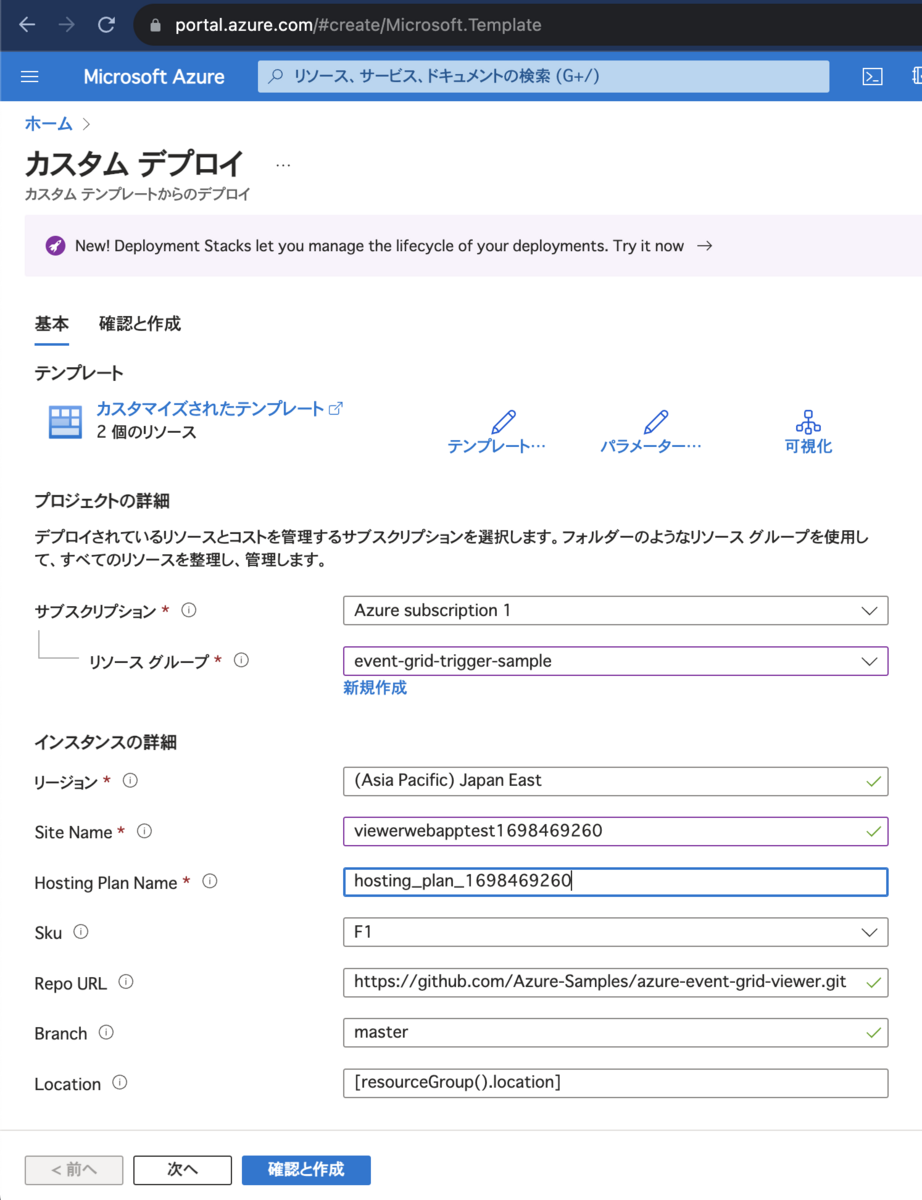
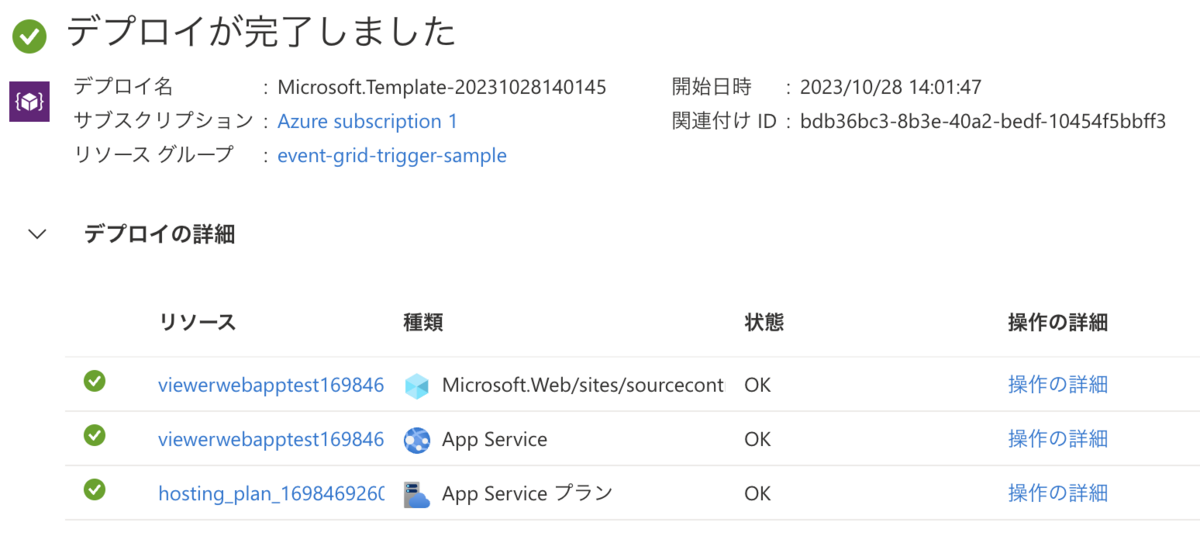
デプロイが成功すると以下のリソースが作成される
2-2. Event Grid の イベント サブスクリプション を作成
ドキュメント
手順
ファイルのアップロード先となる
Azure BLOB Storage Containerを作成ストレージアカウントを作成ストレージアカウントにデータストレージ: コンテナー(コンテナ名: upload) を作成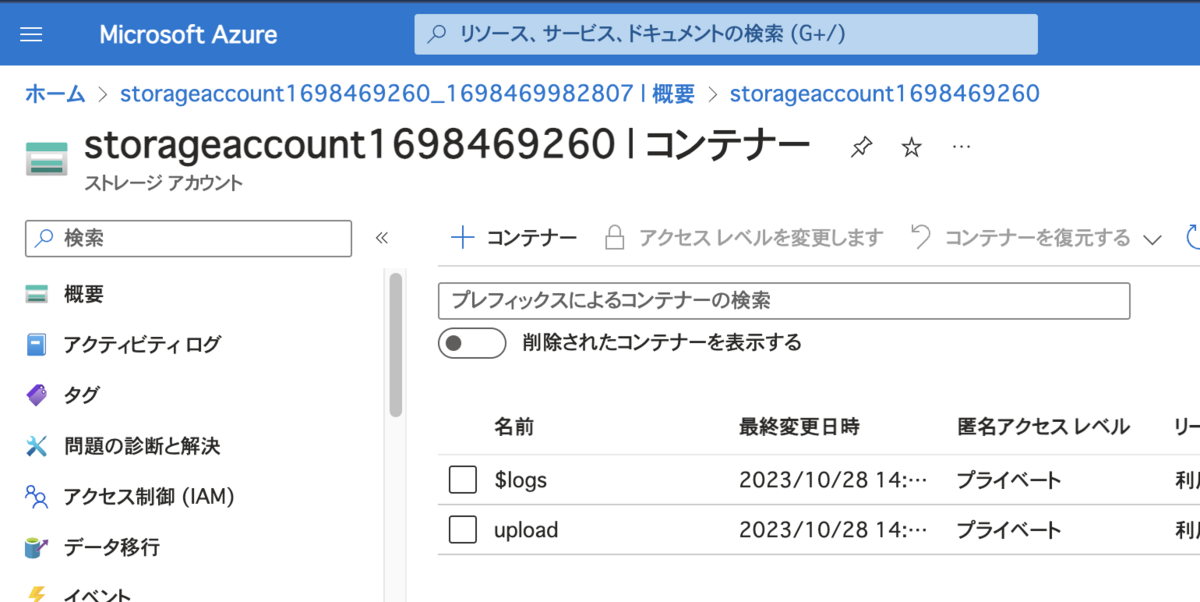
Event Grid の イベント サブスクリプションを作成 (※1)- サブスクリプションに
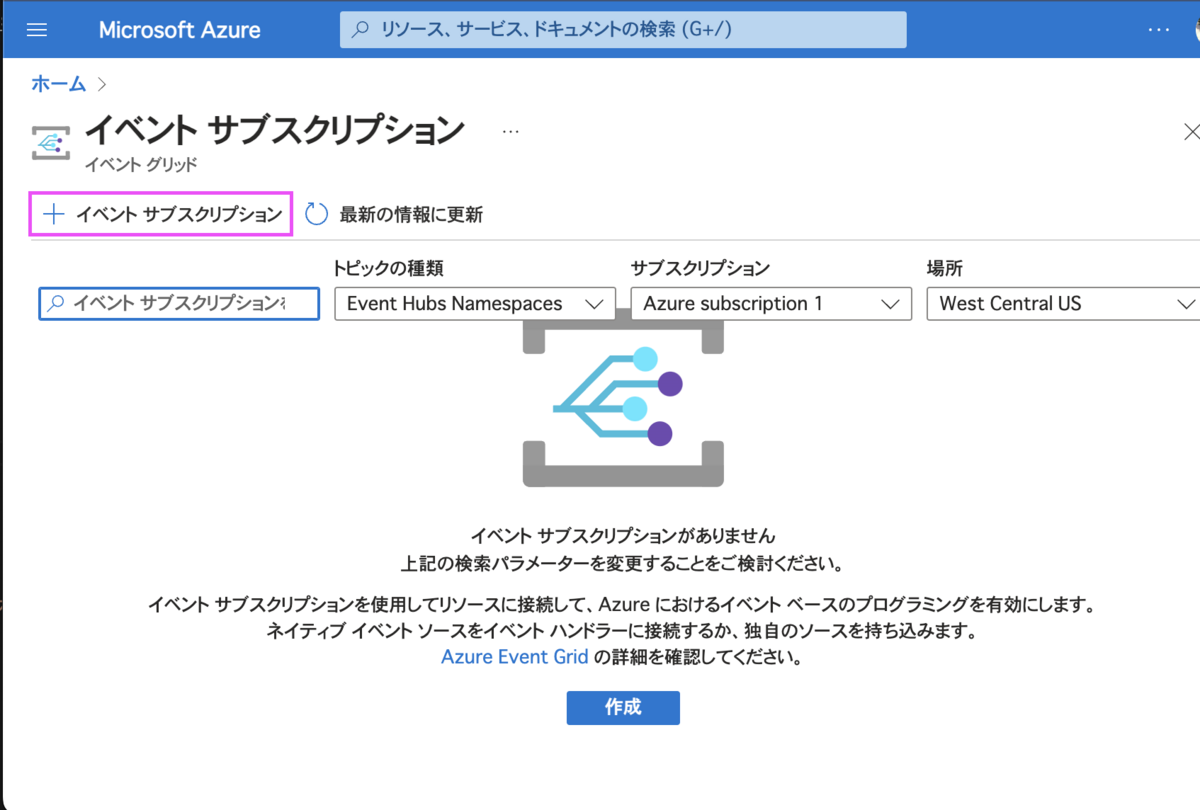
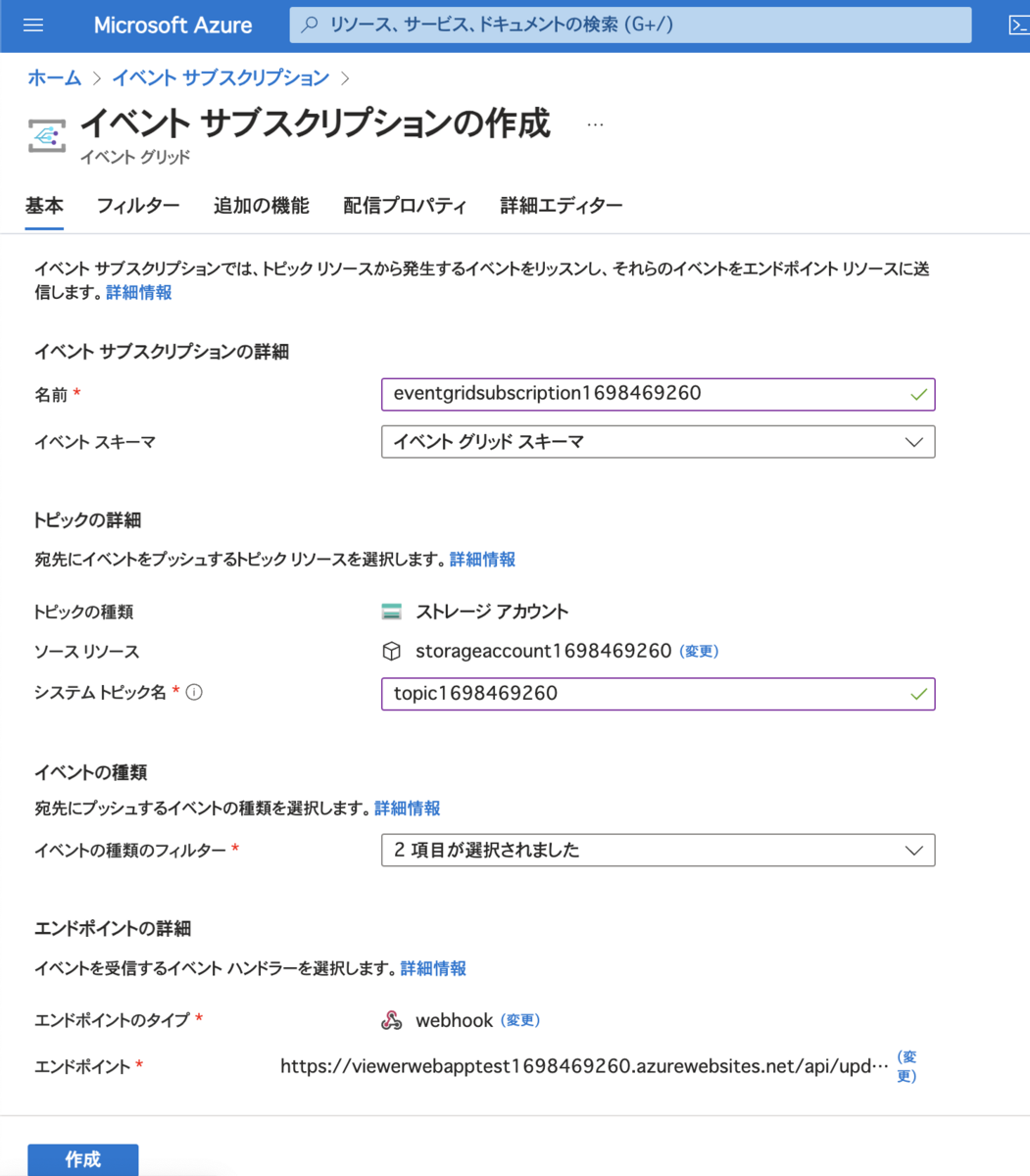
Event Grid リソース プロバイダーを登録 Event Grid システム トピック及びイベント サブスクリプションを作成イベント サブスクリプション > 「+ イベントブスクリプション」より以下の内容で作成- トピックの種類
- ストレージアカウント
- ソースリソース
- 上記で作成したストレージアカウント
- エンドポイントのタイプ
- webhook
- エンドポイント ※イベントの送信先
https://{「Event Grid Viewer アプリ」のドメイン}/api/updates- 今回の例:
https://viewerwebapptest1698469260.azurewebsites.net/api/updates
- 今回の例:
- トピックの種類
- サブスクリプションに
※1 ハマりどころ
Azure Portalのバグなのか Event Grid トピック > (対象のトピックを選択) > 「+ イベントブスクリプション」 からだとサブスクリプションが作成できなかった
- 回避方法
イベント サブスクリプション > 「+ イベントブスクリプション」からだと作成できる
- 参考
2-3. Event Grid Viewer アプリ で EventGrid のイベントメッセージをキャプチャ
手順
ブラウザで
Event Grid Viewer アプリを開いておく上記で作成した
Azure BLOB Storage Containerにファイルをアップロード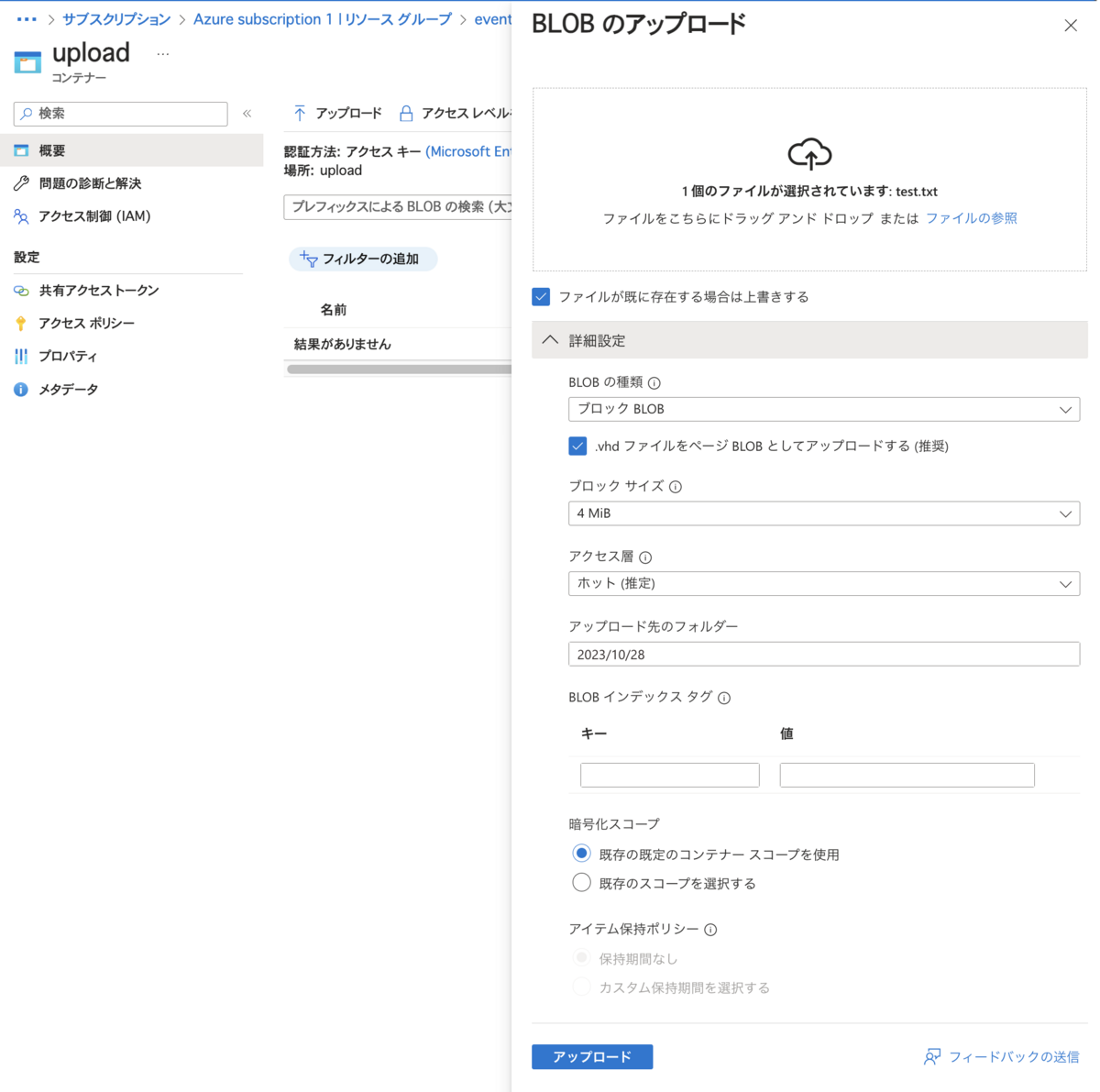
Event Grid Viewer アプリにEvent Grid イベント メッセージが届くので、Web上でメッセージ内容を確認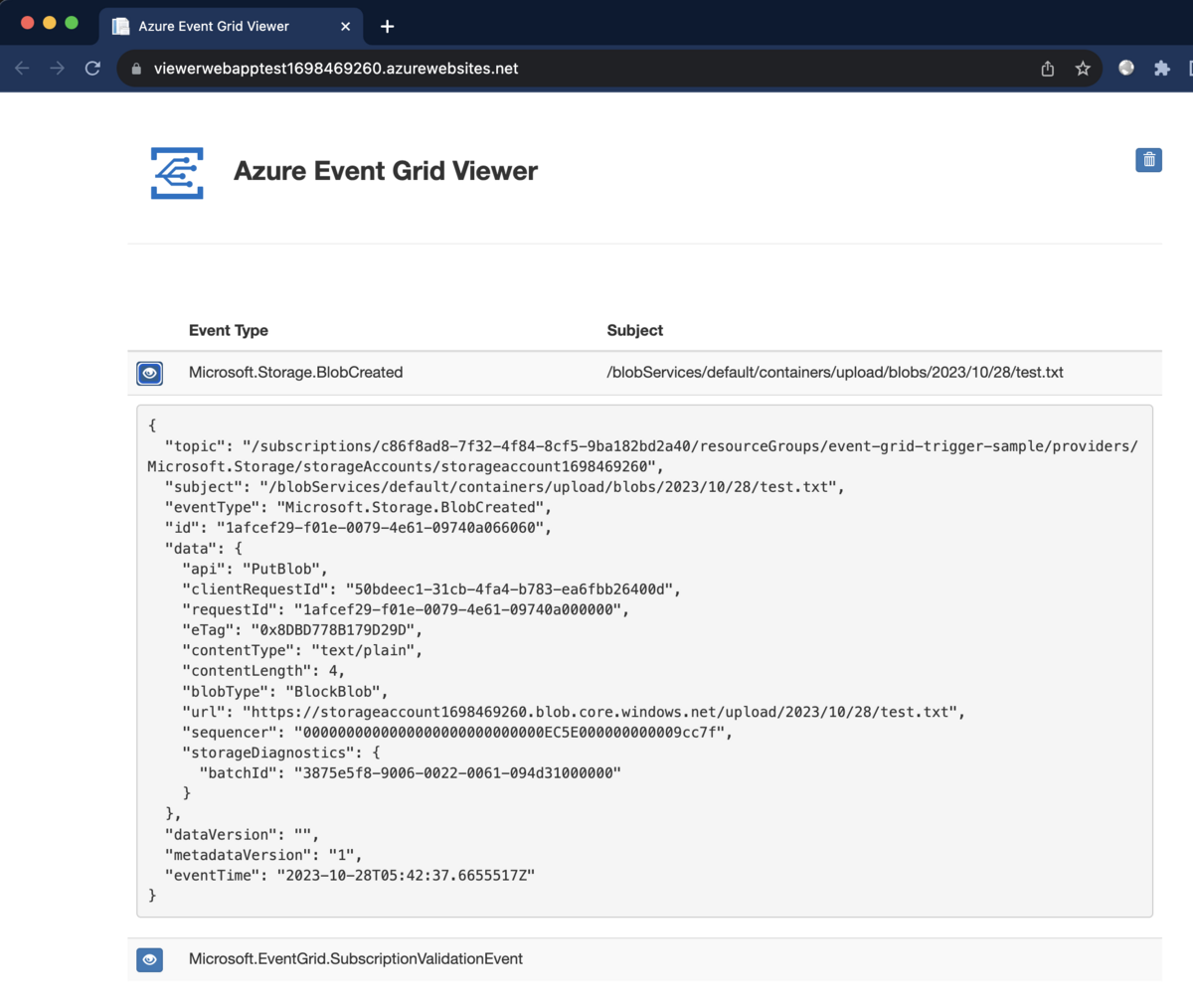
{
  "topic": "/subscriptions/c86f8ad8-7f32-4f84-8cf5-9ba182bd2a40/resourceGroups/event-grid-trigger-sample/providers/Microsoft.Storage/storageAccounts/storageaccount1698469260",
  "subject": "/blobServices/default/containers/upload/blobs/2023/10/28/test.txt",
  "eventType": "Microsoft.Storage.BlobCreated",
  "id": "1afcef29-f01e-0079-4e61-09740a066060",
  "data": {
    "api": "PutBlob",
    "clientRequestId": "50bdeec1-31cb-4fa4-b783-ea6fbb26400d",
    "requestId": "1afcef29-f01e-0079-4e61-09740a000000",
    "eTag": "0x8DBD778B179D29D",
    "contentType": "text/plain",
    "contentLength": 4,
    "blobType": "BlockBlob",
    "url": "https://storageaccount1698469260.blob.core.windows.net/upload/2023/10/28/test.txt",
    "sequencer": "0000000000000000000000000000EC5E000000000009cc7f",
    "storageDiagnostics": {
      "batchId": "3875e5f8-9006-0022-0061-094d31000000"
    }
  },
  "dataVersion": "",
  "metadataVersion": "1",
  "eventTime": "2023-10-28T05:42:37.6655517Z"
}
3. Azure Functions Core Tools の func コマンド で Azure Function をローカルでホスト
Azure Functions Core Tools の func コマンド で Azure Function をローカルで起動します
ドキュメント
手順
Azurite コンテナを起動
docker run -p 10000:10000 -p 10001:10001 mcr.microsoft.com/azure-storage/azurite
プロジェクトの直下に
local.settings.jsonを以下の内容で設置- "AzureWebJobsStorage": "UseDevelopmentStorage=true" は azurite を使用する設定
{
  "IsEncrypted": false,
  "Values": {
    "AzureWebJobsStorage": "UseDevelopmentStorage=true",
    "FUNCTIONS_WORKER_RUNTIME": "node",
    "AzureWebJobsFeatureFlags": "EnableWorkerIndexing"
  }
}
tsc で TypeScript を JavaScript に変換
yarn build
funcコマンドで eventGridTriggerSample 関数をローカルで起動func start eventGridTriggerSample --typescript
$ func start eventGridTriggerSample --typescript

Azure Functions Core Tools
Core Tools Version:       4.0.5413 Commit hash: N/A  (64-bit)
Function Runtime Version: 4.25.3.21264

[2023-10-28T06:06:17.001Z] Worker process started and initialized.

Functions:

    eventGridTriggerSample: eventGridTrigger

For detailed output, run func with --verbose flag.
[2023-10-28T06:06:22.030Z] Host lock lease acquired by instance ID '000000000000000000000000816E9EDC'.
EventGrid Trigger の URL にリクエストし、ローカルでホストしている Azure Function をトリガー
EventGrid Trigger の URL を呼び出すことで EventGrid Trigger の Azure Function をローカルで実行する事ができます。
ドキュメント
EventGrid Trigger の URL
http://localhost:7071/runtime/webhooks/eventgrid?functionName={FUNCTION_NAME}
手順
EventGrid Trigger の URLにリクエスト- Request Body で上記で取得した 「EventGried の イベントメッセージ」を指定して POST
curl http://localhost:7071/runtime/webhooks/eventgrid?functionName=eventGridTriggerSample \
-H "Content-Type: application/json" \
-H "aeg-event-type: Notification" \
-d '{
  "topic": "/subscriptions/c86f8ad8-7f32-4f84-8cf5-9ba182bd2a40/resourceGroups/event-grid-trigger-sample/providers/Microsoft.Storage/storageAccounts/storageaccount1698469260",
  "subject": "/blobServices/default/containers/upload/blobs/2023/10/28/test.txt",
  "eventType": "Microsoft.Storage.BlobCreated",
  "id": "1afcef29-f01e-0079-4e61-09740a066060",
  "data": {
    "api": "PutBlob",
    "clientRequestId": "50bdeec1-31cb-4fa4-b783-ea6fbb26400d",
    "requestId": "1afcef29-f01e-0079-4e61-09740a000000",
    "eTag": "0x8DBD778B179D29D",
    "contentType": "text/plain",
    "contentLength": 4,
    "blobType": "BlockBlob",
    "url": "https://storageaccount1698469260.blob.core.windows.net/upload/2023/10/28/test.txt",
    "sequencer": "0000000000000000000000000000EC5E000000000009cc7f",
    "storageDiagnostics": {
      "batchId": "3875e5f8-9006-0022-0061-094d31000000"
    }
  },
  "dataVersion": "",
  "metadataVersion": "1",
  "eventTime": "2023-10-28T05:42:37.6655517Z"
}' --verbose
作業ログ: EventGrid Trigger の URL にリクエストし、eventGridTriggerSample 関数をトリガーした様子
- リクエスト
$ curl http://localhost:7071/runtime/webhooks/eventgrid?functionName=eventGridTriggerSample \
> -H "Content-Type: application/json" \
> -H "aeg-event-type: Notification" \
> -d '{
>   "topic": "/subscriptions/c86f8ad8-7f32-4f84-8cf5-9ba182bd2a40/resourceGroups/event-grid-trigger-sample/providers/Microsoft.Storage/storageAccounts/storageaccount1698469260",
>   "subject": "/blobServices/default/containers/upload/blobs/2023/10/28/test.txt",
>   "eventType": "Microsoft.Storage.BlobCreated",
>   "id": "1afcef29-f01e-0079-4e61-09740a066060",
>   "data": {
>     "api": "PutBlob",
>     "clientRequestId": "50bdeec1-31cb-4fa4-b783-ea6fbb26400d",
>     "requestId": "1afcef29-f01e-0079-4e61-09740a000000",
>     "eTag": "0x8DBD778B179D29D",
>     "contentType": "text/plain",
>     "contentLength": 4,
>     "blobType": "BlockBlob",
>     "url": "https://storageaccount1698469260.blob.core.windows.net/upload/2023/10/28/test.txt",
>     "sequencer": "0000000000000000000000000000EC5E000000000009cc7f",
>     "storageDiagnostics": {
>       "batchId": "3875e5f8-9006-0022-0061-094d31000000"
>     }
>   },
>   "dataVersion": "",
>   "metadataVersion": "1",
>   "eventTime": "2023-10-28T05:42:37.6655517Z"
> }' --verbose
*   Trying 127.0.0.1:7071...
* Connected to localhost (127.0.0.1) port 7071 (#0)
> POST /runtime/webhooks/eventgrid?functionName=eventGridTriggerSample HTTP/1.1
> Host: localhost:7071
> User-Agent: curl/8.1.2
> Accept: */*
> Content-Type: application/json
> aeg-event-type: Notification
> Content-Length: 983
>
< HTTP/1.1 202 Accepted
< Content-Length: 0
< Date: Sat, 28 Oct 2023 06:28:51 GMT
< Server: Kestrel
<
* Connection #0 to host localhost left intact
~ $
- eventGridTriggerSample 関数がトリガーされた
[2023-10-28T06:28:51.995Z] Executing 'Functions.eventGridTriggerSample' (Reason='EventGrid trigger fired at 2023-10-28T15:28:51.9435940+09:00', Id=ca807f6d-683c-4ddd-a68c-4e088fa4e650)
[2023-10-28T06:28:52.081Z] Event grid function processed event: {
[2023-10-28T06:28:52.081Z]   topic: '/subscriptions/c86f8ad8-7f32-4f84-8cf5-9ba182bd2a40/resourceGroups/event-grid-trigger-sample/providers/Microsoft.Storage/storageAccounts/storageaccount1698469260',
[2023-10-28T06:28:52.081Z]   subject: '/blobServices/default/containers/upload/blobs/2023/10/28/test.txt',
[2023-10-28T06:28:52.081Z]   eventType: 'Microsoft.Storage.BlobCreated',
[2023-10-28T06:28:52.081Z]   id: '1afcef29-f01e-0079-4e61-09740a066060',
[2023-10-28T06:28:52.081Z]   data: {
[2023-10-28T06:28:52.081Z]     api: 'PutBlob',
[2023-10-28T06:28:52.081Z]     clientRequestId: '50bdeec1-31cb-4fa4-b783-ea6fbb26400d',
[2023-10-28T06:28:52.081Z]     requestId: '1afcef29-f01e-0079-4e61-09740a000000',
[2023-10-28T06:28:52.081Z]     eTag: '0x8DBD778B179D29D',
[2023-10-28T06:28:52.081Z]     contentType: 'text/plain',
[2023-10-28T06:28:52.081Z]     contentLength: 4,
[2023-10-28T06:28:52.081Z]     blobType: 'BlockBlob',
[2023-10-28T06:28:52.081Z]     url: 'https://storageaccount1698469260.blob.core.windows.net/upload/2023/10/28/test.txt',
[2023-10-28T06:28:52.081Z]     sequencer: '0000000000000000000000000000EC5E000000000009cc7f',
[2023-10-28T06:28:52.081Z]     storageDiagnostics: { batchId: '3875e5f8-9006-0022-0061-094d31000000' }
[2023-10-28T06:28:52.081Z]   },
[2023-10-28T06:28:52.081Z]   dataVersion: '',
[2023-10-28T06:28:52.081Z]   metadataVersion: '1',
[2023-10-28T06:28:52.081Z]   eventTime: '2023-10-28T05:42:37.6655517Z'
[2023-10-28T06:28:52.081Z] }
[2023-10-28T06:28:52.112Z] Executed 'Functions.eventGridTriggerSample' (Succeeded, Id=ca807f6d-683c-4ddd-a68c-4e088fa4e650, Duration=155ms)
サンプル
CakePHP 4.x に ParaTest を導入
CakePHP 4.x に ParaTest を導入
テストの数が増えてきて全件テストを実行するのに時間がかかるようになった為、ParaTestを導入し、テストを並列実行するようにしてみました。
version
ドキュメント
ParaTest
- PHPUnit でのテストを並列で実行できるツール
- 並列数(プロセス数)はオプションで指定できる
- テストクラス単位で並行実行される模様
- 環境変数
ParaTestに並列実行されるプロセスごとに1から始まる連番が設定される- DB を利用したテストを並列実行する際は、
TEST_TOKENを利用して、各プロセス毎に利用するDBを分けるが必要がある
- DB を利用したテストを並列実行する際は、
- Laravel 10.x の並列テストでは内部的に ParaTest を使用
導入効果
元々 06:27 かかっていたところが 01:48 で実行できるようになりました
ParaTest (8 プロセス):01:48PHPUnit (1 プロセス):06:27
CakePHP 4.x への導入方法のメモ
DB が絡むテストを並列実行する際は、
TEST_TOKENを利用して、各プロセス毎に利用するDBを分ける等の工夫が必要になる
- 今回はCakePHPのコアのコードを読み、以下のようにする事で、各プロセス毎に利用するDBの出し分けを実現しました
- Fixtureの調整あたりで少しハマりました
ParaTest をインストール
composer require --dev brianium/paratest --with-all-dependencies
並列数分のテスト用DBを作成する
- 今回は 8 プロセスで並列実行する想定なので、並列数分のテスト用DBを作成
- 作成方法は割愛
app_local.php の Datasources に ParaTest 用の connection の設定を追加
- CakePHPの内部的な実装の都合で connection 名を
test_で始まるものにする必要がある
// app/config/app_local.php

$paraTestConnectionBase = [
    'className' => Connection::class,
    'driver' => //...,
    //...

    'host' => env('DB_HOST'),
    'port' => env('DB_PORT'),
    'username' => env('DB_USER'),
    'password' => env('DB_PASSWORD'),
    'encoding' => env('DB_ENCODING', 'UTF8'),
    'timezone' => env('DB_TIMEZONE', 'UTC'),
]

// ...

return [
    //...
    'Datasources' => [
        // ...

        // ParaTest用のconnection
        // note: connection名を `test_` で始まるものにする必要がある
        'test_1' => $paraTestConnectionBase + ['database' => env('DB_NAME').'_test1'],
        'test_2' => $paraTestConnectionBase + ['database' => env('DB_NAME').'_test2'],
        'test_3' => $paraTestConnectionBase + ['database' => env('DB_NAME').'_test3'],
        'test_4' => $paraTestConnectionBase + ['database' => env('DB_NAME').'_test4'],
        'test_5' => $paraTestConnectionBase + ['database' => env('DB_NAME').'_test5'],
        'test_6' => $paraTestConnectionBase + ['database' => env('DB_NAME').'_test6'],
        'test_7' => $paraTestConnectionBase + ['database' => env('DB_NAME').'_test7'],
        'test_8' => $paraTestConnectionBase + ['database' => env('DB_NAME').'_test8'],
TEST_TOKEN を元に、各プロセス毎の Connection の設定を調整
\Cake\TestSuite\Fixture\PHPUnitExtension::executeBeforeFirstTestの処理をカスタマイズする必要があった為、PHPUnitのBeforeFirstTestHookを利用し、以下のようにカスタマイズ
// app/phpunit.xml.dist

//...
  <extensions>
    <extension class="Path\To\AppExtension"/>
    //...
// Path/To/AppExtension.php

//...
use PHPUnit\Runner\BeforeFirstTestHook;

//...
class AppExtension implements BeforeFirstTestHook
{
    /**
     * what:
     *  \Cake\TestSuite\Fixture\PHPUnitExtension::executeBeforeFirstTest の処理に、
     *  ParaTest 使用時の connection を調整する為の処理を追加したもの
     */
    public function executeBeforeFirstTest(): void
    {
        $helper = new ConnectionHelper();
        $helper->addTestAliases();

        // for ParaTest
        $paraTestToken = getenv('TEST_TOKEN');
        if ($paraTestToken !== false) {
            // ParaTestで各プロセス用のconnectionを設定する為に、
            // \Cake\TestSuite\ConnectionHelper::addTestAliases で設定した ConnectionManager::alias('test', 'default'); を上書き
            ConnectionManager::alias("test_{$paraTestToken}", 'default');
        }

        $enableLogging = in_array('--debug', $_SERVER['argv'] ?? [], true);
        if ($enableLogging) {
            $helper->enableQueryLogging();
            Log::drop('queries');
            Log::setConfig('queries', [
                'className' => 'Console',
                'stream' => 'php://stderr',
                'scopes' => ['queriesLog'],
            ]);
        }
    }
Fixture で利用する connection を調整
TEST_TOKENを元に、当該プロセス用のconnectionを設定
// app/tests/Fixture/AppTestFixture.php

//...
use Cake\TestSuite\Fixture\TestFixture;

//...
class AppTestFixture extends TestFixture
{
    public function __construct()
    {
        // ParaTestの場合は、当該プロセス用のconnectionを設定
        $paraTestToken = getenv('TEST_TOKEN');
        if ($paraTestToken !== false) {
            $this->connection = "test_{$paraTestToken}";
        }

        parent::__construct();
    }
}
class XxxxFixture extends AppTestFixture
Test用DBのmigration方法を調整
- こちらも
TEST_TOKENを元に当該プロセスで利用するDBをmigrateするように調整 - 各DB毎に1回だけmigrateされるように調整
// app/tests/bootstrap.php

// Run migrations for multiple plugins
$migrator = new Migrator();

$paraTestToken = getenv('TEST_TOKEN');

// for ParaTest
if ($paraTestToken !== false) {
    $dirName = TMP . 'tests' . DS . 'paratest' . DS;
    $fileName = "migrated-test_{$paraTestToken}";
    $path = $dirName . $fileName;

    // 1DBにつき1回のみmigrate
    if (!file_exists($path)) {
        $DBName = "test_{$paraTestToken}";
        $connectionName = $DBName;

        $migrator->runMany([
            //...
            ['connection' => $connectionName, 'plugin' => '//...'],
        ]);

        if (!file_exists($dirName)) {
            mkdir($dirName);
        }
        touch($path);
    }
} else {
    $migrator->runMany([
        //...
        ['connection' => 'test', 'plugin' => '//...'],
    ]);
}
上記で作成した一時ファイルをParaTest実行前に削除するように設定
// composer.json

{
    //..
    "scripts": {
        //..
        "paratest": "rm -rf tmp/tests/paratest && ./vendor/bin/paratest -p 8",
ParaTest実行
composer paratest
CakePHP 4.x: Entityのカラム一覧は、DBのスキーマを参照して取得しており、取得結果は schema_cache としてキャッシュされている
CakePHP の実装
- 実際のスキーマを元に、Entity 取得時に実行される SQL の SELECT 句に指定するカラム一覧を生成している
- 上記は schema_cache としてキャッシュされる
- migration ファイルで \Migrations\Table::update を実行時に schema_cache が再考構築される
- これにより、通常は、カラム削除を伴う migration を実行しても問題が起こらない
ハマった事
- BGデプロイメントで、カラム削除を伴う migration をデプロイした際に、ブルー側で、存在しないカラムを SELECT する SQL が実行されエラーになった
- why
- 対策
- 対象 Table クラスのコンストラクタで
$this->getSchema()->removeColumn('対象カラム名')を実行する事で、schema_cache が古くても、「存在しないカラムの SELECT」を回避できる - migration のデプロイ前に、予め
$this->getSchema()->removeColumn('対象カラム名')をデプロイしておく事で今回のエラーを回避できる
- 対象 Table クラスのコンストラクタで
// 対象テーブルクラス

public function __construct(array $config = [])
{
    parent::__construct($config);

    // これにより、 `SELECT 削除予定のカラム, ...` が発生しなくなる
    $this->getSchema()->removeColumn('削除予定のカラム名');
}
ドキュメント
アプリケーションをデプロイする時にプラグインを使用する場合、 テーブルのカラムメタデータを更新するように、必ず ORM キャッシュをクリアしてください。 そうしなければ、それらの新しいカラムの操作を実行する時に、カラムが存在しないエラーになります。
M2 Mac で Apollo Twin X を使えるようにする方法
2023/02/11 の時点では、mac を macOS 復旧 で起動し、“低セキュリティ ”オプション を設定する必要があります。
作業日
- 2023/02/11
経緯
mac book pro 2016 (13 インチ)が突然故障し、再起不能となり、M2 Max の mac book pro (14インチ)を購入- 旧PCは起動できない状態
- 新PCに、
Time Machineをバックアップを復元した
備考
UADハードウェアのトランスファーが必要になる事を懸念していたが、トランスファーは必要なかった
Apollo Twin X を使えるようにする方法 (作業ログ)
- まず、
UAD Meter & Control Panelを再インストール- こちら を参考にアンインストール
- https://www.uaudio.jp/downloads/uad の
macOS用をダウンロードよりUAD-v10.2.2-Mac.zipをダウンロードし、解答した中身のUAD-v10.2.2-Mac.pkgを実行し、再インストール
UAD Meter & Control Panelに表示されるエラーに応じて、下記を実施Driver not installed correctlyが表示される場合- hookup.co.jp に記載の手順 で
“低セキュリティ ”オプションを設定
- hookup.co.jp に記載の手順 で
Connect UA Deviceが表示される場合Apollo Twin Xが mac に正しく接続されている事を確認 (ケーブルが抜けていてハマりました...)
Click Allow in Security & Privacyが表示される場合システム設定 > プライバシーとセキュリティ > セキュリティから開発元"Universa Audio"のシステムソフトウェアがアップデートされました。の許可を押下- ※
Venturaでシステム設定のUIが変更されているので、参考サイトを読む際は、スクショが古い事を念頭に置いて参考サイトを読む
- ※
効果があったかどうかわからないこと
SIPの無効化macOS 復旧で起動し、ターミナルよりcsrutil disableを実行
- ※作業完了後に、
csrutil enableで再度有効化した
TODO
UAD Meter & Control Panelが正式に M2 Mac に対応したら、“低セキュリティ ”オプションを解除すること!
教訓
Time Machineのバックアップを常時すること- 3 週間ほどバックアップをサボってしまい、その間に作成した譜面や、リハ/ライブの音源を消失しました...
PHPStorm で File Structure のショートカット(cmd + F12)が効かない事象の調査メモ
事象
- cmd + F8(Breakpoints) などは効く
- cmd + F12 だけ効かない
- キーストロークは IDE に到達しますか?
- => 到達しないので、
他のプログラムまたはオペレーティングシステムがショートカットをインターセプトしている
- => 到達しないので、
解消方法
- アクティビティモニタでプログラムを1つずつ強制終了していき、インターセプトしているプログラムを探す
- インターセプトしている側で、ショートカットの割当を変更する
今回のログ
Azure DevOps Pipelines: pr: none を明示しないと、PR作成時に、意図せず Pipeline が動いてしまう
- デフォルトで生成される
azure-pipelines.ymlは以下- 注意点
pr: noneが明示されていなので、PR作成時に Pipeline が動く
- 注意点
trigger:
- main

pool:
  vmImage: ubuntu-latest
steps:
- script: echo Hello, world!
  displayName: 'Run a one-line script'
- script: |
    echo Add other tasks to build, test, and deploy your project.
    echo See https://aka.ms/yaml
  displayName: 'Run a multi-line script'
検証用リポジトリ
CakePHP4.x: hasMany の Association を contain すると 別SQL になる仕組み
- 以前、hasMany の Association を contain すると 別SQL になるという内容の記事を書きました
- 今回は、どのような仕組みで別SQLになるのか、コアのコードを追ってみました
version
- CakePHP: 4.2.8
仕組み
\Cake\ORM\EagerLoader::loadExternal によって、別SQLになる
Decorates the passed statement object in order to inject data from associations that cannot be joined directly.
別SQLになるアソシエーションのリストが \Cake\ORM\EagerLoader::$_loadExternal に格納されるA list of associations that should be loaded with a separate query
- how
// 流れ
\Cake\Database\Driver::prepare
  \Cake\ORM\Query::sql
    \Cake\ORM\Query::_transformQuery
      \Cake\ORM\EagerLoader::attachAssociations
        \Cake\ORM\EagerLoader::attachableAssociations
          \Cake\ORM\EagerLoader::_resolveJoins
理解できていない事
- hasMany の Association を contain した場合は、別SQLにする、という設計になっている理由 (設計思想)
作業ログ
以下のような Learning Test を書いて、デバッグした
    /**
     * @group leaning
     */
    public function testHasMany(): void
    {
      //..

      $query = $ArticlesTable->find();

      // Articles belongsTo Authors
      // Articles hasMany Comments
      $query->contain(['Authors', 'Comments']);
      $result_set = $query->all();

      // ...
    }
デバッグログ
// Leaning Test 内で \Cake\ORM\Query::all を実行
string(17) "get_class($query)"
string(14) "Cake\ORM\Query"
string(54) "↓ \Cake\ORM\Query::all $this->getRepository()::class"
  string(28) "App\Model\Table\ArticlesTable"
  string(69) "↓↓ \Cake\Datasource\QueryTrait::all $this->getRepository()::class"
    string(28) "App\Model\Table\ArticlesTable"
      string(65) "↓↓↓ \Cake\ORM\Query::_execute $this->getRepository()::class"
      string(28) "App\Model\Table\ArticlesTable"
      string(121) "!!!!!!!! \Cake\ORM\Query::_execute | $statement = $this->getEagerLoader()->loadExternal($this, $this->execute()) !!!!!!!!"
        string(72) "↓↓↓↓ \Cake\Database\Query::execute $this->getRepository()::class"
          string(28) "App\Model\Table\ArticlesTable"
          string(30) "\Cake\Database\Connection::run"
          string(34) "\Cake\Core\Retry\CommandRetry::run"
          string(43) "\Cake\Database\Connection::run の callback"
          string(34) "\Cake\Database\Connection::prepare"
          string(34) "\Cake\Core\Retry\CommandRetry::run"
          string(47) "\Cake\Database\Connection::prepare の callback"
          string(34) "\Cake\Database\Driver::prepare (1)"
          string(38) "\Cake\Database\Driver::prepare (2) sql"
          string(1134) "SELECT ... FROM Articles Articles INNER JOIN Authors Authors ON (Authors.id = (Articles.author_id))"
          string(60) "\Cake\Database\Driver::prepare (end) return new PDOStatement"
        string(121) "↑↑↑↑ \Cake\Database\Query::execute (end) return \Cake\Database\StatementInterface | $this->getRepository()::class"
        string(28) "App\Model\Table\ArticlesTable"
        string(83) "↓↓↓↓↓ \Cake\ORM\EagerLoader::loadExternal  $query->getRepository()::class"
          string(28) "App\Model\Table\ArticlesTable"
          string(81) "\Cake\ORM\EagerLoader::loadExternal (2) $external is not empty | count($external)"
          int(1)
          string(68) "\Cake\ORM\EagerLoader::loadExternal (3) foreach ($external as $meta)"
          string(62) "\Cake\ORM\EagerLoader::loadExternal (3-1) ※foreach内 $alias"
          string(7) "Articles"
          string(54) "↓ \Cake\ORM\Query::all $this->getRepository()::class"
            string(26) "App\Model\Table\CommentsTable"
            string(69) "↓↓ \Cake\Datasource\QueryTrait::all $this->getRepository()::class"
              string(26) "App\Model\Table\CommentsTable"
              string(65) "↓↓↓ \Cake\ORM\Query::_execute $this->getRepository()::class"
                string(26) "App\Model\Table\CommentsTable"
                string(121) "!!!!!!!! \Cake\ORM\Query::_execute | $statement = $this->getEagerLoader()->loadExternal($this, $this->execute()) !!!!!!!!"
                  string(72) "↓↓↓↓ \Cake\Database\Query::execute $this->getRepository()::class"
                    string(26) "App\Model\Table\CommentsTable"
                    string(30) "\Cake\Database\Connection::run"
                    string(34) "\Cake\Core\Retry\CommandRetry::run"
                    string(43) "\Cake\Database\Connection::run の callback"
                    string(34) "\Cake\Database\Connection::prepare"
                    string(34) "\Cake\Core\Retry\CommandRetry::run"
                    string(47) "\Cake\Database\Connection::prepare の callback"
                    string(34) "\Cake\Database\Driver::prepare (1)"
                    string(38) "\Cake\Database\Driver::prepare (2) sql"
                    string(399) "SELECT ... FROM Comments Comments WHERE Comments.article_id in (:c0)"
                    string(60) "\Cake\Database\Driver::prepare (end) return new PDOStatement"
                  string(121) "↑↑↑↑ \Cake\Database\Query::execute (end) return \Cake\Database\StatementInterface | $this->getRepository()::class"
                  string(26) "App\Model\Table\CommentsTable"
                  string(83) "↓↓↓↓↓ \Cake\ORM\EagerLoader::loadExternal  $query->getRepository()::class"
                    string(26) "App\Model\Table\CommentsTable"
                  string(78) "↑↑↑↑↑ \Cake\ORM\EagerLoader::loadExternal (1-end) $external is empty"
              string(113) "↑↑↑ \Cake\ORM\Query::_execute (end) return new ResultSet($this, $statement) | $this->getRepository()::class"
              string(26) "App\Model\Table\CommentsTable"
            string(120) "↑↑ \Cake\Datasource\QueryTrait::all (end) return \Cake\Datasource\ResultSetInterface | $this->getRepository()::class"
            string(26) "App\Model\Table\CommentsTable"
            string(106) "↑ \Cake\ORM\Query::all (end) return \Cake\Datasource\ResultSetInterface | $this->getRepository()::class "
          string(26) "App\Model\Table\CommentsTable"
          string(126) "\Cake\ORM\EagerLoader::loadExternal (3-end) ※foreach内 $statement = new CallbackStatement($statement, $driver, $f) | $alias"
          string(7) "Articles"
        string(98) "↑↑↑↑↑ \Cake\ORM\EagerLoader::loadExternal (end) return \Cake\Database\StatementInterface"
      string(113) "↑↑↑ \Cake\ORM\Query::_execute (end) return new ResultSet($this, $statement) | $this->getRepository()::class"
    string(28) "App\Model\Table\ArticlesTable"
  string(120) "↑↑ \Cake\Datasource\QueryTrait::all (end) return \Cake\Datasource\ResultSetInterface | $this->getRepository()::class"
  string(28) "App\Model\Table\ArticlesTable"
string(106) "↑ \Cake\ORM\Query::all (end) return \Cake\Datasource\ResultSetInterface | $this->getRepository()::class "
string(28) "App\Model\Table\ArticlesTable"
